Corporation Tax now displayed separately in the Profit and Loss Report
Posted 2 days ago by Tracy
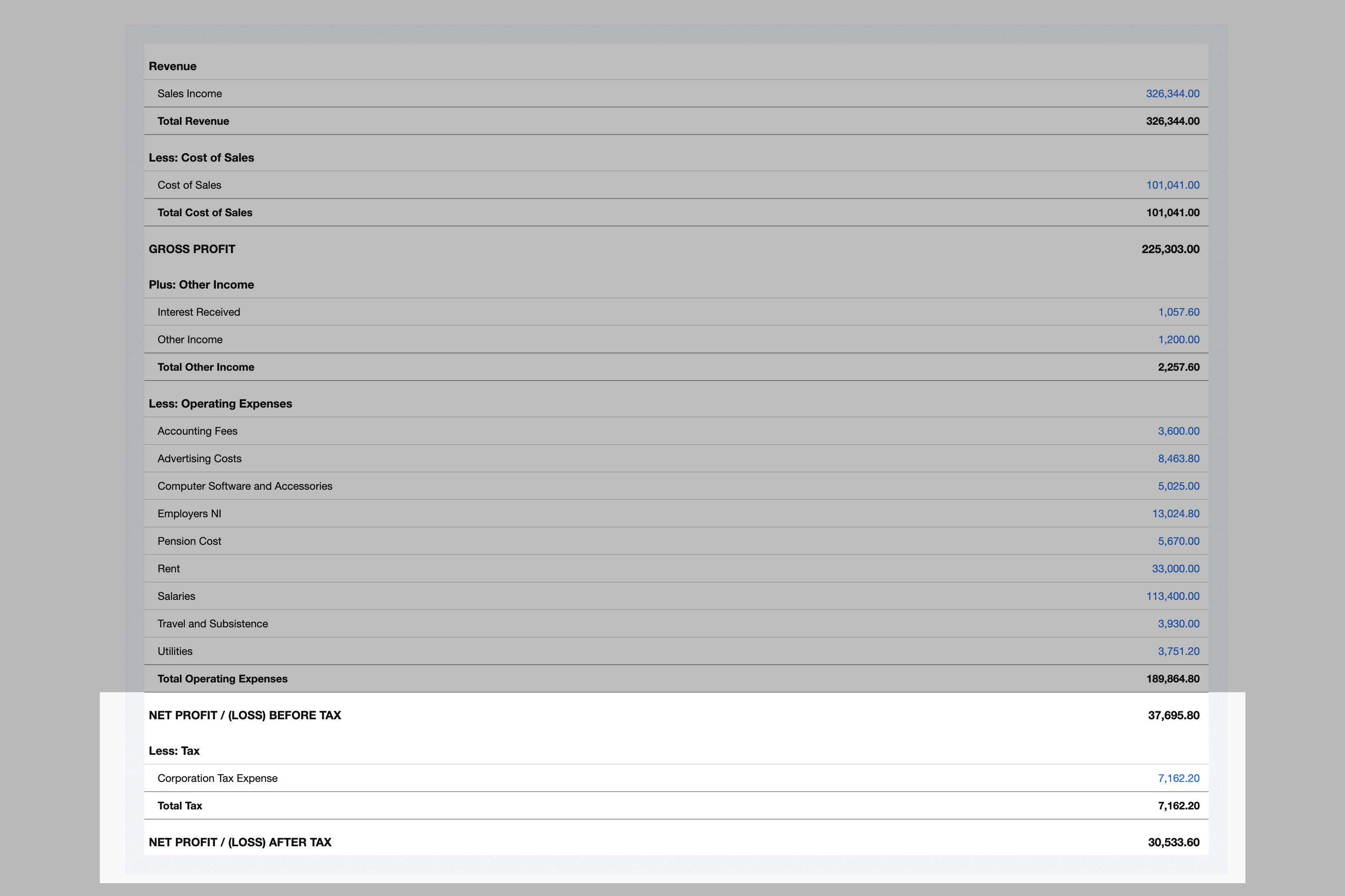
The AccountsPortal Profit and Loss Report now separates Corporation Tax from your other expenses. You'll see your Net Profit Before Tax, the tax charge, and your Net Profit After Tax, set out the way accountants and Companies House expect.
What's new
The bottom of your Profit and Loss report used to show a single Net Profit / (Loss) figure, with Corporation Tax listed among your operating expenses. It now ends with three lines:
- Net Profit / (Loss) Before Tax: what the business earned from trading, after all running costs.
- Less: Tax: a new Taxation section showing your corporation tax charge for the period.
- Net Profit / (Loss) After Tax: what is left for the company once tax is accounted for.
Here's how that looks for an example company:
| Sales | 120,000 |
| Less: Cost of sales | -30,000 |
| Gross profit | 90,000 |
| Less: Expenses | -50,000 |
| Net profit before tax | 40,000 |
| Less: Corporation Tax | -7,600 |
| Net profit after tax | 32,400 |
The change applies everywhere the report appears: on screen, in the PDF download and in the CSV export. If you run the report by month or quarter, each period column shows the before-tax and after-tax figures too.
Why it matters
Corporation Tax isn't a cost of running your business like rent or salaries. It's a charge on the profit you've already made. Mixing it in with your other expenses hides both numbers: your operating profit looks smaller than it really is, and you can't see your tax bill at a glance.
Splitting the two gives you a clearer picture:
- Compare like with like. Profit before tax shows how the business is trading, whatever the tax rate. That makes it easier to compare one year with the next, or your business with others.
- Know what you can pay out. Dividends are paid out of profits after tax. The after-tax line shows how much this period has added to the profits available to distribute.
- Match your statutory accounts. Regulatory accounts display profit before tax, the tax charge and profit after tax. Your management reports now follow the same layout, so there's less to reconcile at year end.
Read more: A Guide to the Profit and Loss Account
What happens to your existing accounts
You don't need to do anything. We've added a new Tax Account Type, and the Corporation Tax Expense account (code 6040) in your chart of accounts has moved to it automatically. Every transaction you've posted to that account now appears in the Taxation section, including those in past periods.
A few things to know:
- Renamed accounts are included. If you've given account 6040 a different name, it has still moved to the Tax type.
- Changed account types are left alone. If you previously changed account 6040 to something other than an expense, we haven't touched it. You can set it to Tax yourself under Settings → Chart of Accounts.
- Other tax accounts. If you record Corporation Tax in an account you created yourself, edit it and choose the Tax account type to move it into the Taxation section.
- New companies get Corporation Tax Expense set up as a Tax account from day one.
Your profit before tax and after tax are new lines, but the figures behind them haven't changed. Your bottom-line profit after tax is the same as the old net profit figure.
Recording Corporation Tax
If you haven't recorded your Corporation Tax yet, a simple journal at your year end does it. Once you or your accountant have worked out the bill, post:
| Account | Debit | Credit |
|---|---|---|
| 6040 Corporation Tax Expense | 7,600 | |
| 2010 Corporation Tax Payable | 7,600 |
The debit shows the charge in the Taxation section of your Profit and Loss. The credit records what you owe HMRC on your Balance Sheet. When you pay the bill, match the bank payment to Corporation Tax Payable to clear it.
Try it now
Open Reports → Profit & Loss Statement to see the new layout with your own figures.
Not using AccountsPortal yet? Start a free trial and see why thousands of small businesses use it to run their books, file VAT returns and stay on top of their tax.
Further Reading
Bank Feeds for your Online Accounting Software
AccountsPortal joins new Stripe Partner Program
Custom email settings allow you to change the From Name and Email Address